
Features
Overview of Chimr's features, including notifications, calendar management, the menu bar, and MCP integration.
Chimr is a powerful macOS menu bar meeting reminder with built-in MCP server integration. Designed for developers and professionals who work with AI assistants daily, Chimr ensures you never miss what matters while keeping your workflow intact.
🔔 Notifications & Alerts
Smart Notifications
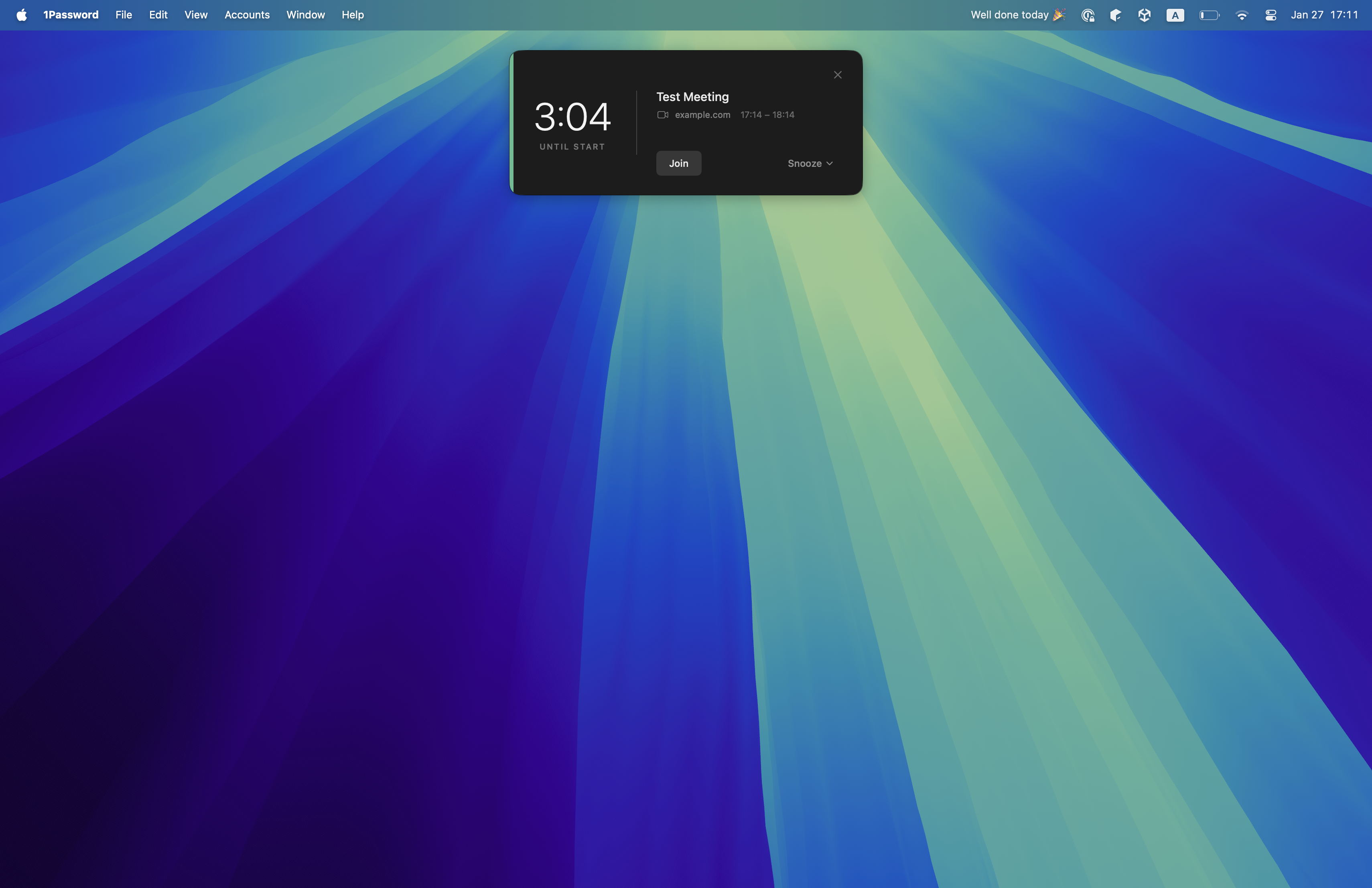
- Floating card alerts with countdown timers that capture attention without blocking your entire screen
- Customizable notification timing (1, 3, 5, 10, or 15 minutes before events)
- Support for all-day events and video-conference-only filtering
- Works across all desktop spaces and above fullscreen applications
Advanced Notification Features
- Snooze functionality with customizable intervals (1, 3, 5, 10, or 15 minutes)
- Attendance-based filtering - Only get notified for events you’ve accepted
- Smart notification timing - Never get duplicate alerts
- Persistent snooze tracking - Survives app restarts
📅 Calendar Management
Calendar View
- Beautiful monthly calendar grid with event indicators
- Color-coded events matching your calendar colors
- Navigate between months with ease

Multi-Calendar Support
- Separate display and notification calendars - See all events but only get notified for important ones
- Event overlap detection - Visual warnings for conflicting meetings
- Calendar color coding - Instantly identify event sources
👥 Event Management
Event Details & Actions
- Quick join button for video meetings
- Attendance information - See who’s organizing, required, or optional
- Event details popover - Rich information at your fingertips
- Open in Calendar app - Deep integration with macOS Calendar
- Location support - Open physical addresses in Apple Maps
🖥️ Menu Bar Experience
Dynamic Menu Bar
- Live status indicator - Shows “LIVE” during ongoing events
- Smart countdown - Time until your next meeting
- Free day messages - Motivational messages when you have no events
- Multiple display modes - Icon only, event info, or time only
💻 Video Meeting Integration
Seamless Meeting Joins
- One-click join for Zoom, Google Meet, Teams, and Webex
- Automatic video URL detection in event URL, location, description, and title
- Quick join button in notifications and menu bar
🤖 AI Integration
MCP Server
Chimr’s standout feature is its built-in MCP (Model Context Protocol) server:
- Claude Desktop & Claude Code integration - Let AI query your calendar and open your next call
- Natural-language scheduling - Ask about today, a single date, or a whole date range
- Privacy-first design - 4 privacy levels (in the current version, only Strict changes what’s shared)
- No dependencies - MCP runs directly from the app binary
- Local processing - All data stays on your Mac
Available MCP tools:
chimr_ping- Health checkchimr_get_today_events- Today’s schedulechimr_get_events- Events for any datechimr_get_events_range- Date range analysischimr_join_video_meeting- Join calls via AIchimr_show_notification- Registered, but not yet functional (returns “not implemented”; planned)
⚙️ Customization
Settings & Preferences
- 14 languages - English, German, Spanish, French, Hindi, Indonesian, Italian, Japanese, Korean, Portuguese, Russian, Vietnamese, Simplified Chinese, Traditional Chinese
- Launch at login - Start with macOS
- Notification preferences - Fine-tune when and how you’re alerted
- Calendar selection - Choose which calendars to display and monitor
- Menu bar customization - Icon-only, event info, or time-only modes
- MCP privacy settings - Control what data AI assistants can access
🎯 Unique Features
- Countdown timer display - See exactly how long until your meeting starts
- Attendee role indicators - See who’s organizing, required, or optional
- Calendar color accent - Quick visual identification in notifications
- Smooth animations - Elegant fade-in/fade-out transitions
- Dark mode support - Seamless macOS integration
- Keyboard shortcuts - Quick access to settings (⌘,) and quit (⌘Q)
🔒 Privacy
- Local-only processing - Calendar data never leaves your Mac
- MCP privacy levels - Strict, Minimal, Standard, or Detailed
- Granular controls - Choose exactly what to share with AI
- No external servers - All computation happens on your device
Getting Started
Ready to transform your meeting experience? Check out our Getting Started guide for quick setup instructions.